
TMJ slices from a CBCT, condyle by condyle
tresD DICOM finds both condyles in the CBCT and gives you, for each side, sagittal slices perpendicular to its axis every 1 mm, plus a coronal and an axial slice at the level of the head. You scroll through them with the wheel, measure on them and, if you wish, mark the joint spaces with a guide.
Open my CBCT nowFree · nothing to install · your files never leave your computer
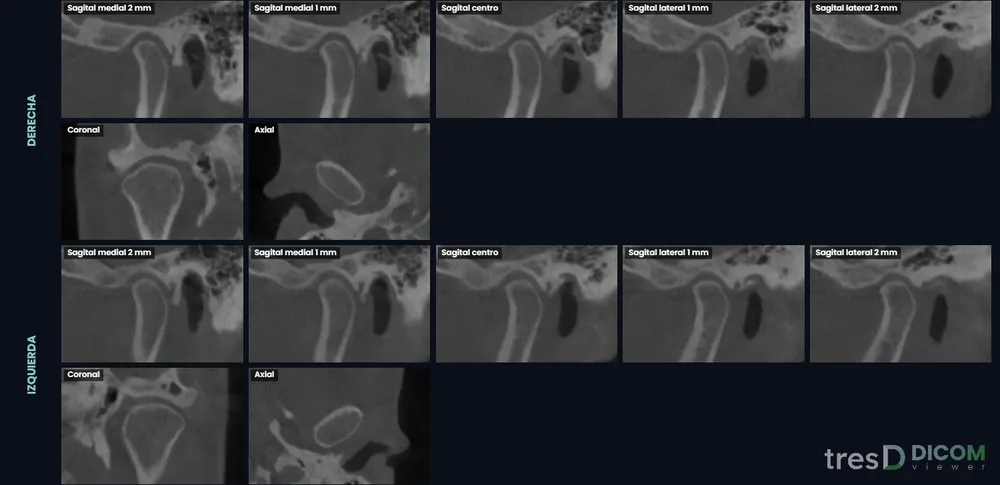
What you see
For each side, a mosaic with five sagittal slices 1 mm apart, from medial to lateral and perpendicular to the long axis of the condyle, plus a coronal and an axial slice at the level of the condylar head. The wheel moves millimetre by millimetre, a double click enlarges a slice and the right button zooms.
The medial and lateral poles of the condyle are found automatically at its widest section, below the joint space, and can be repositioned by hand. In large CBCTs the TMJ slices are read at the original resolution of the study.
Measuring and joint spaces
- Distances and angles on any slice; the points can be dragged and the value is recomputed.
- Guided joint spaces with the Ikeda and Kawamura method (2009): superior (SS), anterior (AS) and posterior (PS) on the central sagittal slice of each condyle, with two taps per space and a diagram showing where each point goes.
- A table with the adult norm and Pullinger’s concentricity, in green, orange or red depending on the deviation.
- Coloured reference lines between the slices (they can be hidden), image filters and a capture of each slice.
Everything goes into the PDF report, with its own joint spaces section. Measurements are indicative and depend on where the points are placed.
How to do it
Open the CBCT
At tresddicom.com/app. The study must include both joints.
Press «🦴 TMJ slices»
The coronal slice jumps to the level of the condyles, enlarged, with the proposed R and L marks. If they are right, «✓ Use these»; if not, click on the right condyle and then on the left one.
Scroll through the slices
Use the wheel over a slice to move millimetre by millimetre, double click to see it large and drag for brightness and contrast.
Measure
On the enlarged slice, «📏 Distance» or «📐 Angle». For the joint spaces, «📏 Joint spaces» and follow the guide for each side.
Add it to the report
With the 📌 button or by ticking «TMJ slices» in the report window.
Watch it on video
Common questions
Do I have to mark the condyles by hand?
Usually not: when you open TMJ the viewer finds and proposes them. If one is wrong, a click on each condyle is enough.
How far apart are the slices?
Every 1 mm. The sagittal slices are perpendicular to the long axis of the condyle and the wheel moves through them millimetre by millimetre.
How are the joint spaces measured?
With the Ikeda and Kawamura method (2009), on the central sagittal slice of each condyle: the viewer guides you point by point and compares each space with the adult norm. It is an indicative measurement that depends on the points you mark.
Does it work with a small field of view CBCT?
Only if the study includes the joints. If they are not there, the viewer warns you.
Is the CBCT uploaded anywhere?
No. Everything is computed on your computer.
Other features
Try it with your CBCT
Free, no sign-up and nothing to install. Your files never leave your computer.
Open my CBCT now