
Panoramic from a CBCT, in your browser
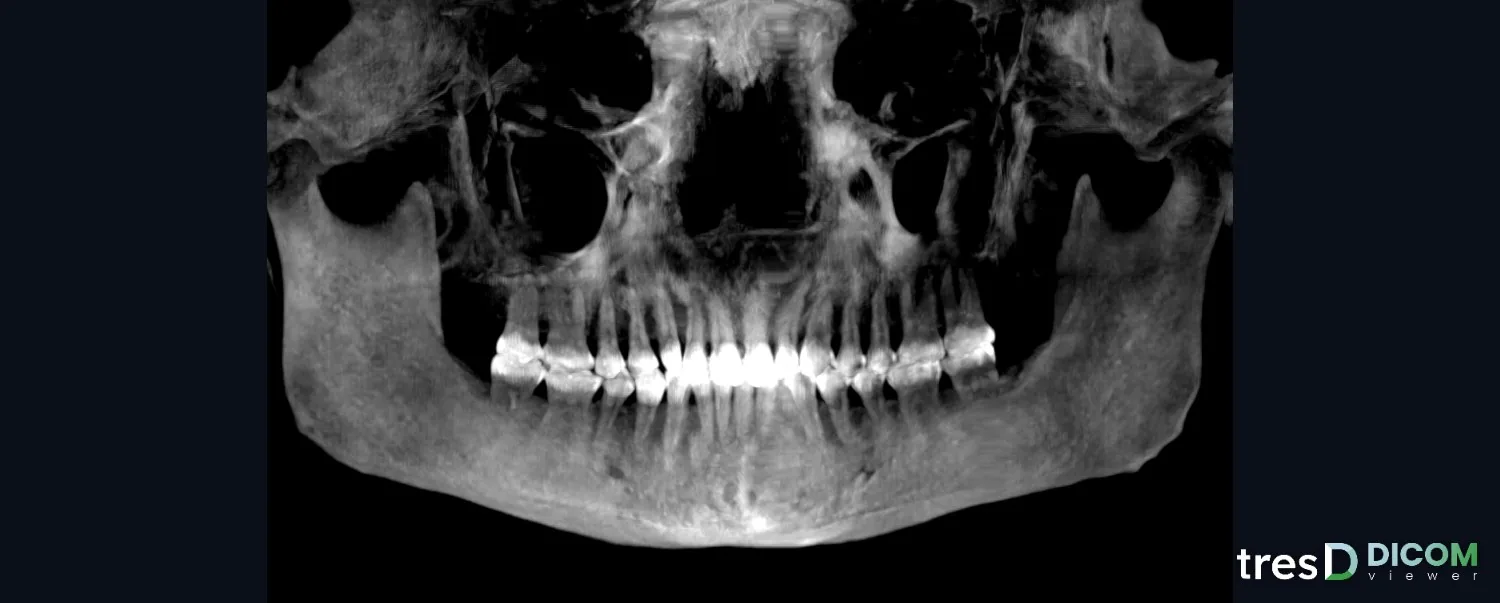
tresD DICOM reconstructs a panoramic from the CBCT itself, following the arch from one condyle to the other. You adjust the curve and the thickness, measure on it and, with one click on a tooth, see its buccolingual slice. Nothing to install and the study is never uploaded.
Open my CBCT nowFree · nothing to install · your files never leave your computer
What a CBCT panoramic is
It is a curved slice that follows the dental arch and is unrolled onto a plane, like a panoramic X-ray, but made from the CBCT voxels. Since it is not a new radiograph, there is no need to expose the patient again to get it.
In tresD DICOM the curve places itself on the teeth and reaches the condyles. The image is computed at 0.2 mm per pixel, interpolating between voxels, so it holds up well when enlarged. In large CBCTs the panoramic area is read at the original resolution even if the 3D was reduced to fit in the graphics card.
What you can adjust
- The curve: automatic, editable by dragging its points on the axial slice, or drawn by hand from one condyle to the other.
- The thickness of the slice with a slider, and MIP mode, which keeps only the densest structures.
- Image filters: normal, hyperrealistic, sharp, soft, high contrast, inverted and ivory.
- Measurements of distance and angle on the panoramic, always indicative.
- Tooth-by-tooth slices: perpendicular to the curve, every 1 mm, 0.5 to 5 mm thick, with a 1 and 5 mm grid and their own measurements.
The panoramic and the slices go into the PDF report with the 📌 button and can be downloaded as an image or as DICOM with their pixel size. If you orient the skull first (for example on the Frankfurt plane), the panoramic follows that orientation.
How to do it
Open the CBCT
Go to tresddicom.com/app and choose the CBCT folder, its DICOM files or the ZIP. If you are not sure which folder it is, see the guide for your scanner.
Press «Panoramic»
It is in the top bar. The curve places itself on the arch and you get the image in a few seconds; a window shows the progress while it is computed.
Adjust the curve if needed
«✎ Edit curve» shows the axial slice with the curve points: drag them and press «✔ Finish editing». «✏ Draw curve» redraws it with clicks from one condyle to the other and «↺ Automatic curve» recomputes it.
Choose thickness, MIP and filter
With the thickness slider and the MIP checkbox in the bottom bar. Filters change the image instantly.
Look at each tooth
Press «⟂ Cross-sections» and click on the tooth: its slice opens, and you can scroll through it with the wheel or the arrow keys, measure and capture it.
Watch it on video
Common questions
Do I need another X-ray to get the panoramic?
No. The panoramic is taken from the CBCT data you already have: the patient is not exposed again.
Does it reach the condyles?
Yes: the automatic curve goes from one condyle to the other through the arch. With a small field of view, it reaches as far as the study covers.
Can I measure on the panoramic?
Yes, distances and angles, and also on each tooth slice. Measurements are indicative: they depend on the voxel size, the thickness and where you place the points.
Is the CBCT uploaded to a server?
No. Everything is computed on your computer and the files never leave it.
How much does it cost?
Nothing: it is free, with no sign-up and no limit on studies.
Other features
Try it with your CBCT
Free, no sign-up and nothing to install. Your files never leave your computer.
Open my CBCT now