
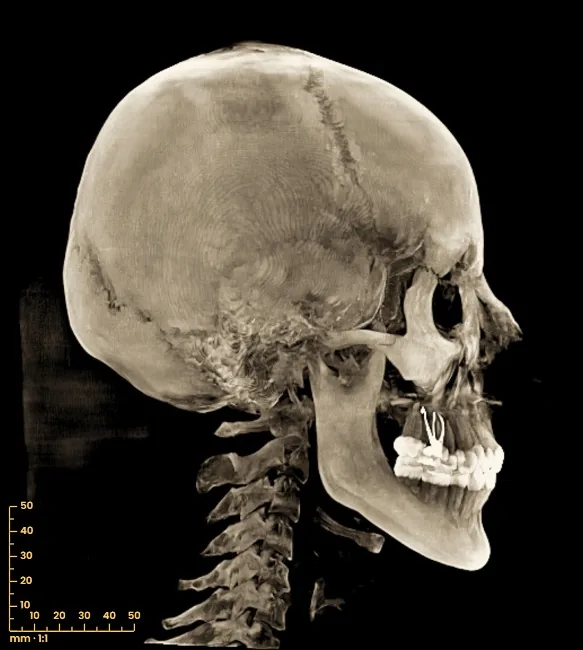
Lateral and frontal cephalogram from the CBCT
The lateral and frontal cephalograms come from the same CBCT, projected with parallel rays at 1:1 scale, without exposing the patient again. Before that, if you wish, straighten the skull on the Frankfurt plane, the axis-orbital plane or the natural head position.
Open my CBCT nowFree · nothing to install · your files never leave your computer
How it is obtained
The viewer projects the CBCT volume onto a plane with parallel rays, like a cephalogram. That is why the scale is 1:1 in real millimetres, without the 8-10 % magnification of a conventional cephalogram: keep it in mind when comparing with cephalometric norms. Only what the CBCT covers is shown: with a small field of view there will be no sella or nasion.
- Lateral (face to the right) or frontal (PA).
- Radiograph (summed attenuation: soft tissue and bone superimposed) or MIP (only the densest structures).
- A tilt slider to level the head, image filters and a 50 mm ruler with marks every 5 mm.
- Indicative measurements of distance and angle, which rotate with the image.
The cephalogram, with its measurements, goes into the PDF report and can be downloaded as an image or as DICOM with its pixel size.
With the skull oriented
The projection follows the orientation of the case in «⟲ Skull orientation»:
- Frankfurt plane: the viewer proposes porion and orbitale on both sides; you check them in 3D and accept.
- Axis-orbital: using the three lead markers some CBCTs carry, which are found automatically.
- Natural head position: like the head in the frontal rest photo, if you have draped it on the skin.
- By hand, with three sliders, or the original orientation of the CBCT.
The same orientation applies to the slices, the panoramic and the TMJ.
How to do it
Open the CBCT
At tresddicom.com/app. For a complete lateral view, the field must include the cranial base.
Orient the skull (optional)
Left panel, «⟲ Skull orientation» → «⊥ Frankfurt»: check the four proposed points in 3D and press «✓ Accept and orient».
Press «Ceph»
In the top bar. It is computed once per view (a few seconds) and then switches instantly.
Choose view and mode
«Lateral» or «Frontal (PA)», and «Radiograph» or «MIP». Adjust the tilt and the filter.
Measure and save it
With «📏 Distance» and «📐 Angle». Add it to the report with 📌 or download it with «⬇ DICOM».
Watch it on video
Common questions
Is another X-ray needed?
No. The cephalogram is taken from the CBCT data, so the patient is not exposed again.
Why do the measurements differ from those of a conventional cephalogram?
Because here the rays are parallel and the scale is 1:1, without the 8-10 % magnification of a cephalogram taken with the machine. Also, all measurements are indicative.
Is the whole head shown?
Only what the CBCT covers. With a small field of view, structures such as the sella turcica or nasion will be missing.
How do I set the Frankfurt plane?
In «⟲ Skull orientation» → «⊥ Frankfurt». The viewer proposes porion and orbitale on both sides; if one is wrong, drag it onto the bone or mark it step by step.
Is the CBCT uploaded to a server?
No. The projection is computed on your computer.
Other features
Try it with your CBCT
Free, no sign-up and nothing to install. Your files never leave your computer.
Open my CBCT now