
Midpalatal suture, transverse slice and cervical vertebrae
Three views designed for orthodontics that place themselves on the CBCT: the midpalatal suture, a transverse slice through the first molars and the cervical vertebrae. Each with its own controls, measurements and capture, in your browser and free.
Open my CBCT nowFree · nothing to install · your files never leave your computer
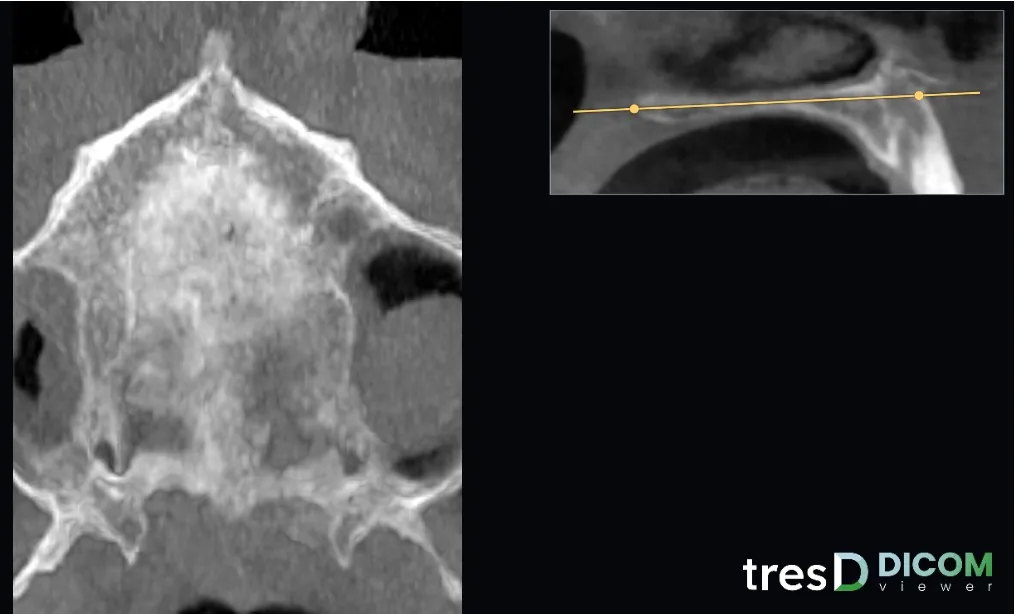
Midpalatal suture
The «Suture» view sets a slice parallel to the ANS-PNS plane, found automatically, halfway through the thickness of the palate. The midline is taken from the symmetry of the skull. From the sagittal thumbnail you rotate the plane and a slider adjusts the height; if the plane is not right, «✎ Mark ANS and PNS» redoes it with two clicks. By default it uses 3 mm thickness in MIP, and you can change it and apply filters.
Transverse slice through the first molars
The «Transverse» view gives a high-resolution coronal slice through the first molars. You rotate and move it from the axial thumbnail and step forwards or backwards with the wheel. It has a 1 and 5 mm grid, and you can measure distances and angles on it.
Cervical vertebrae
The «Vertebrae» view shows the sagittal and coronal slices of the cervical vertebrae, found automatically behind the airway. Each slice has position and tilt sliders, and the line of the other slice is shown in yellow so you know where it passes.
All three views have indicative distance and angle measurements, capture and the 📌 button for the PDF report. They are views for looking and teaching: the assessment is always the professional’s.
How to do it
Open the CBCT
At tresddicom.com/app. For the suture and the transverse slice a field including the maxilla is enough; for the vertebrae, it must reach the neck.
Choose the view
«Suture», «Transverse» or «Vertebrae» in the view bar. The slice places itself.
Adjust the slice
From the thumbnail (sagittal for the suture, axial for the transverse slice) or with the sliders; the wheel moves through the slices and dragging changes brightness and contrast.
Measure and save
With «📏 Distance» and «📐 Angle», capture the view or add it to the report with 📌.
Watch it on video
Common questions
How is the suture slice placed?
Automatically: the viewer finds the ANS-PNS plane and sets the slice parallel to it, halfway through the palate. If it is not right, redo it by marking ANS and PNS with two clicks.
Does it classify the stage of the suture or the vertebrae?
No. They are views to see the structures with the slice well placed; the assessment is made by the professional.
Can I measure in these views?
Yes, distances and angles, and the transverse slice has a 1 and 5 mm grid. Measurements are indicative.
Is the CBCT uploaded to a server?
No. Everything is computed on your computer.
Other features
Try it with your CBCT
Free, no sign-up and nothing to install. Your files never leave your computer.
Open my CBCT now